One of the features available on Lightroom mobile are to create an "Edit Replay" following is an example
Sunday, July 16, 2023
Edit Replay using Lightroom mobile
I frequently enable share photos by using Lightroom classic collection sharing. I them use Lightroom mobile to share them to various social media or others.

Saturday, July 15, 2023
Problems with my camera
We went for a Maple Creamee after cleaning up after the flooding in Vermont. After we finished our treat I decided to take a photo of the treeline grunge line.
I grabbed my camera but of there's Hawk flying alone the field. Full zoo, dark view finder. What's wrong. Auto ISO, f/8.0, 1/500s. What's wrong? Changed to sequence shooting. No help. What could be wrong?
Then I removed the lens cap. Duh. What a roockie.
Friday, July 14, 2023
Photoing textures
The Camera Club I an a member of suggested for our next meeting we submit photos of textures.
So I wanted to see what Bard, Google's AI, would suggest. There were 3 drafts and I choose 3, which is below.
Here are some suggestions for photoing textures:
- Use a macro lens. A macro lens will allow you to get up close and personal with the texture, capturing all the details.
- Use a polarizing filter. A polarizing filter can help to reduce reflections and glare, making the texture stand out more.
- Use natural light. Natural light is the best light for capturing texture. If you're shooting indoors, try to find a window with soft, diffused light.
- Experiment with different angles. Try shooting the texture from different angles to see how it changes. You may find that one angle reveals the texture more than another.
- Use a tripod. A tripod will help to keep your camera steady, which is important for capturing sharp images of textures.
- Edit your photos. Once you've taken your photos, you can edit them to further enhance the texture. You can use photo editing software to adjust the contrast, saturation, and brightness of your photos.

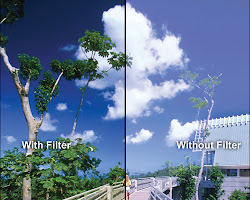
Here are some additional tips:
- Choose a texture that is interesting and visually appealing. The texture should be something that will capture the viewer's attention.
- Simplify the background. A cluttered background will distract from the texture. Try to simplify the background so that the texture is the main focus of the photo.
- Crop your photos tightly. Cropping your photos tightly will help to emphasize the texture.
I hope these suggestions help you to take great photos of textures
Wednesday, July 12, 2023
DoF, Depth Of Field?
We have learned that to get a shallow DoF use a large Aperture. So why does your cellphone camera with a large Aperture, say f/1.7, have a wide DoF. Basically why is everything in acceptable focus?
Why?
Use the comment area to post your answer(s)
Tuesday, July 11, 2023
BBAF and Auto ISO, My Secret Sauce
With anything in photography Your Mileage May Vary, YMMV. You may differ with me and that's OK. It's all about getting the shot.
I must say in 2015 I learned BBAF in a camera club in AZ. Used it and then discarded it. A few years later I rediscovered it and it has been my primary focus mode.
BBAF - https://youtu.be/5fjwZ7HYtbs
Once I decided that noise was something I could tolerate I primarily use BBAF + Auto ISO .
Manual with Auto ISO - https://youtu.be/UPZPv3Z5t_o
My blog post Auto ISO
My Blog post Why I Stopped Worring About Hi ISO
What Settings? photographing northern lights
A while ago I wrote "Don't Ask Me". Since it may be clear night and the northern lights may give me a show I asked Bard, "What are the recommend settings for photographing northern lights with OM-D E-M5 iii"
And AI said "The following are the recommended settings for photographing the Northern Lights with the OM-D E-M5 iii:
- Aperture: f/2.8 or wider. This will allow as much light as possible into the camera, which is essential for capturing the faint light of the aurora.
- ISO: 3200-8000. This will determine how sensitive the camera is to light. A higher ISO will allow you to use a shorter shutter speed, which will help to reduce blur.
- Shutter speed: 1-12 seconds. This will determine how long the camera's shutter is open, allowing light to hit the sensor. A longer shutter speed will allow more light in, but it will also increase the risk of blur.
- White balance: 3500K. This will ensure that the colors of the aurora are accurate.
- Focus: Manual. Autofocus will not be able to focus on the aurora, so you will need to focus manually on a distant light source.
Here are some additional tips for photographing the Northern Lights with the OM-D E-M5 iii:
- Use a tripod to keep the camera steady.
- Use a remote shutter release to avoid camera shake.
- Shoot in RAW format to give you more flexibility in post-processing.
- Experiment with different settings to see what works best for you.
With a little planning and practice, you can capture stunning images of the Northern Lights with your OM-D E-M5 iii.
Here are some additional resources that you may find helpful:
- How to Photograph the Northern Lights with Your Olympus Camera: https://focus9photography.com/free-tutorials/2020/1/22/how-to-shoot-the-northern-lights-aurora-borealis-with-your-olympus-camera
- Night Lights: Photographing the Magic of the Aurora Borealis: https://learnandsupport.getolympus.com/learn-center/photography-tips/astrophotography/night-lights-photographing-the-magic-of-the-aurora
- The Northern Lights: 10 Photography Tips for Beginners: https://www.hurtigruten.com/inspiration/experiences/the-northern-lights/10-photography-tips-for-beginners/"
Just say'n
IMHO all recommendations are just a starting point. Use the settings, take a test shot, evaluate your results and adjust ONE setting.
Focus is likely the most problematic and most important settings. Use manual focus. Most Mirrorless have focus peaking adjustment. Learn it and Use it. With a DSLR use live view and, with both, zoom to a distant object and focus.
Friday, July 7, 2023
I't my Opinion YMMV
What is the purpose of a Photographic Challenge?
Is it ok to recycle photos you have taken in the past to fit the current Challenge?
If so what did you learn? If the setting that were used on you previous camera do they fit your current gear? Ok you met the "challenge" but did you actually learn anything new or find a new location.
In my OPINION it was a useless endeavor. You only searched your catalog of photos to fit the goal. Even if it's the same old subject, challenge, find something new. Get out of your comfort zone. Take a photo. Use your camera not your computer.
That my Opinion.
It's Not That Simple. There are no absolutes (UP Date)
I'll use [] to show changes and additions.
Pressing the shutter release is the simple part. Everything takes time, knowledge and experience.
Most everything you read, videos you watch, meetings or workshops you attend suggest "do this .." to become a better photographer.
But there are no, NO, absolutes only guides.
To improve your photography you need to actually take photos and analyze your results.
I would say the only absolute is composition, focus and as MattK says "The Why ..." Why did you take the photo.
Yes there are "rules" for composition but which for this situation?
Aperture Priority for landscape but ...
[If there is anything that is moving or may move because of the wind or people you need to consider the shutter speed. Your camera is will create a "proper" exposure based on your other settings such as White Balance, WB, Metering and Picture Profile like Vivid, Portrait, etc. To accomplish, with a fixed ISO, will adjust the Shutter Speed, SS. to get the "proper" exposure. The general guideline for proper hand held SS is 1/(focal length) so if your are at 50mm that is 1/50 s.]
Shutter Priority for motion but ...
[Similarly your camera will give you a "proper" exposure.. To do this your camera will adjust the aperture to accomplish it. However your photo may be soft at the extremes of your scene Consider you are taking a landscape on a windy day and you want the foreground, middle ground and background free of blur. Say your SS is 1/600s The only thing your camera can adjust is the aperture. Your camera analyzes the scene and determine the proper Aperture is f/4.0. Is everything acceptably sharp? maybe, maybe not.]
Low ISO for a cleaner photo but ...
[Back in the day, actually not that long ago, many preached "always use ISO 100". Modern camera sensors and software have come a long way. Yes ISO 100 is cleaner, less noise, than 12800 however IMHO get the shot, well exposed, acceptably sharp and focus. Let your camera sensor or/and processing software take care of the noise.]
Never use AUTO but ...
[Consider using AUTO to guide to your settings, when you hand your camera to someone else to take a photo. Frequently the photo is acceptable.]
Use JPEG but ...
[JPEG when you don't do much postprocessing or immediate posting to others. Remember that JPG is like a wrapped deli ham sandwich. You can unwrap and add some condiments but it is still a ham sandwich. ]
Use RAW but ...
[On the other had a RAW file might look like a ham sandwich on your cameras LCD. And you can use postprocessing to make is a toasted turkey and ham sandwich. Your choice.]
Fast shutter speed to eliminate or reduce motion blur but ...
[Is that what you want? It is an artistic choice. Do your want to show motion by blur? Do you want to stop an arrow or bird in flight. These are artistic choices.]
Aperture controls DoF but ...
[Yes a large aperture, small f number, yields a shallow DoF. However there are other variables in play. Such as sensor size, distance between camea, subject and background and add focal length. Often those variables are more important than aperture. See dof simulator]
What is DoF?
["is the distance between the nearest and farthest objects in a photo that appear acceptably sharp"]
Use evaluative metering but ...
[All consumer cameras are set to evaluate the light reaching the sensor so that the brightest and darkest to 18% gray or grey. What is 18%grey? Also remember the other metering modes, center weighted and spot all measure the 18% grey of that area.]
Use Scene mode but ...
[IMHO use them as a guide. Once you have traveled the photography path I seldom use them. Usually for talking points.]
Full Frame or Crop is best but ...
[Yes Full Frame, FF, has a lot of advantages over than other sensor sizes. When you view an image is it half full or half empty? You need to evaluate your needs and make your own decision.]
Lighting, back, front, side, shadow, harsh, soft, golden, blue, ... hour, ...
[Again you need to learn what they are and when to use them. Sometime you have to deal with the light you have. Basically use you feet and walk around the scene to see what light works best for your photo.]
[A new camera will improve my photography
No it will not! If you take bad photos with your current gear new equipment will still take bad photos. New gear may be easier to use for you, maye assist or improve the Auto focus, and provide other features you desire BUT it will not make bad photos better. Learn you current camera to the max.]
There is no one thing that makes you a better photographer. It is the combination of all the items above and more that make you a better photographer. But, in my opinion, you need to know your camera. What buttor, what menu item, what ... If you don't know your camera you will be unable to utilize it to your fullest. This applies to the simplest Point and Shoot, Cell Phone camera to the latest wize bang Mirrorless.
Let me paraphrase President Kennedy's quote "We choose to go to the Moon in this decade and do the other things, not because they are easy, but because they are hard."
This way, We choose to become a better photographers not because they are easy, but because they are hard.
[You only get better by taking photos and analyzing your results.]
Thursday, July 6, 2023
BBAF and Auto, my secret sauce
With anything in photography Your Mileage May Vary. You may differ with me and that's OK. It's all about getting the shot.
I must say in 2015 I learned BBAF in a camera club in AZ. Used it and then discarded it. A few years later I rediscovered it and it has need my primary focus mode.
BBAF https://youtu.be/5fjwZ7HYtbs
Once I decided that noise was something I could tolerate I primarily use Auto ISO .
Manual with Auto ISO https://youtu.be/UPZPv3Z5t_o
As all YMMV.
I must say in 2015 I learned BBAF in a camera club in AZ. Used it and then discarded it. A few years later I rediscovered it and it has need my primary focus mode.
BBAF https://youtu.be/5fjwZ7HYtbs
Once I decided that noise was something I could tolerate I primarily use Auto ISO .
Manual with Auto ISO https://youtu.be/UPZPv3Z5t_o
As all YMMV.
Friday, June 30, 2023
Lightroom Videos I Suggest
A few links for Lightroom Classic
Masking
Organizing Your Photos
Every expert, content creator, ... has their way to do it. It may not work for you. How do you organize is the best way for YOU. BUT once you begin to use Lightroom Classic only use Lightroom Library to rename, move or otherwise modify your photo locations, names etc.
In YouTube I entered this search "how to organise photos in lightroom classic " and there are lots of the best way. You need to find the way that works for you. Following are some that I have viewed and I'm still searching for the BEST .
Monday, May 29, 2023
Finding a shooting position for the Milky Way core
Use Antares as described by this video.
https://youtu.be/8m6jAF0EWT4
Basically find your composition using Antares. Place your camera, settings, tripod pointing to Antares and in about an hour you can Photograph the Milky Way core.
Thursday, May 4, 2023
How to Price Your Photographic Work
You've taken a photo and posted it on the web. Now someone wants to purchase a print. What should you charge?
I'm not a commercial photographer, it's a hobby and I'll say selling photos is a side hustle. Not a job.
That's the BIG depends, Photographic paper, matteing, frame, canvas, metal, glass? There are a number of web pages to help you. I've read many and they you on and on about the business.
Basically many write about your gear cost, you're time in the field, time spent in post processing, and it goes on.
For me it's simply your labor rate + "Parts"(production+shipping).
Labor rate varies widely over the world. So what is your labor rate? Experience, Skill and Complexity should be considered when setting your personal labor rate. $30-$50/hr is reasonable.
So let's say, on average, you create a photo,
Research and planning - 1hr
In the field to "get the shot," - 2hr
Postprocessing - 1hr
The size of the print does not figure it the time to crest the image.
So we have 4 hours, on average, to create an image for sale.
So 4x$30 = $120 to 4x$50 = $200 plus (production+shipping)
So for a recent 11x14 aluminum that costs $45 that brings me to a selling price is $165-$245.
I view my gear as a sunk cost, or at best deprecated asset. Remember it's a hobby.
So where does that leave me? Ok, it's a hobby I think $100+costs is fare. However when I promote my side hustle I figure $120-$200 + costs is reasonable. Your side hustle just became a business.
Really your creation is only worth what the purchaser is willing to pay. So that brings us to, determine your audience.
I'll set as price of $100+ costs when someone asks for a print. The customer and I can agree on a price.
Monday, May 1, 2023
Facebook Cloning, By Bard
How to eliminate or reduce cloning of my Facebook account
Draft 1
There is no foolproof way to eliminate the risk of your Facebook account being cloned, but there are a number of steps you can take to reduce the likelihood that it will happen. Here are some tips:
* **Make your profile less public.** The more information you make public about yourself on Facebook, the easier it is for scammers to create a fake account that looks like yours. Go to your **Profile** page and click on **Settings**. Under **Privacy**, review the settings for each section and make sure that only the information you want to be public is visible. For example, you may want to make your friends list private so that only your friends can see it.
* **Use a strong password and two-factor authentication.** A strong password will make it more difficult for scammers to hack your account. You should also enable two-factor authentication, which adds an extra layer of security by requiring you to enter a code from your phone in addition to your password when you log in.
* **Be careful about what links you click on.** Scammers often send links to fake websites that look like real Facebook pages. If you click on one of these links, you could be infected with malware or have your personal information stolen. Only click on links that you know are safe.
* **Be suspicious of friend requests from people you don't know.** If you receive a friend request from someone you don't know, don't accept it right away. Instead, check their profile to make sure it looks legitimate. If you're still not sure, you can always ask the person to contact you outside of Facebook to verify their identity.
* **Report any cloned accounts you see.** If you see a cloned account that's using your name or likeness, you can report it to Facebook. To do this, go to the cloned profile and click on the **More** button (three dots) in the top right corner. Select **Report Profile** and then follow the instructions.
By following these tips, you can help to protect your Facebook account from being cloned.
Draft 2
Here are some tips on how to eliminate or reduce the risk of your Facebook account being cloned:
* **Use strong passwords and two-factor authentication.** This will make it more difficult for scammers to gain access to your account.
* **Be careful about what information you share publicly.** Scammers can use your public information to create a fake account that looks like yours.
* **Don't click on links from people you don't know.** These links could lead to malicious websites that can infect your computer with malware.
* **Be suspicious of any requests for personal information.** Scammers will often ask for personal information, such as your credit card number or Social Security number, in order to steal your identity.
* **Report any cloned accounts to Facebook.** Facebook will take action to remove these accounts.
Here are some additional tips:
* **Keep your software up to date.** Software updates often include security patches that can help protect you from scammers.
* **Use a security software program.** A security software program can scan your computer for malware and other threats.
* **Be careful about what you download.** Only download files from trusted sources.
* **Back up your data regularly.** This way, if your computer is infected with malware or your account is hacked, you won't lose all of your data.
By following these tips, you can help reduce the risk of your Facebook account being cloned.
Draft 3
There is no foolproof way to eliminate the risk of your Facebook account being cloned, but there are a number of steps you can take to reduce the likelihood that it will happen.
* **Use strong passwords and two-factor authentication.** This will make it more difficult for scammers to gain access to your account in the first place.
* **Be careful about what information you share publicly.** Scammers can use publicly available information to create fake profiles that look like yours. Make sure to only share information that you're comfortable with being public.
* **Be suspicious of friend requests from people you don't know.** If you receive a friend request from someone you don't know, don't accept it right away. Hover over their name to see if their profile is actually a clone.
* **Report any cloned accounts you see.** If you see a cloned account, report it to Facebook immediately. You can do this by going to the cloned profile and clicking the "Report Profile" button.
By following these tips, you can help to protect your Facebook account from being cloned.
Here are some additional tips to help you protect your Facebook account:
* **Keep your software up to date.** Facebook is constantly releasing security updates, so it's important to make sure that you have the latest version of the Facebook app installed on your device.
* **Be careful about clicking on links in messages.** Scammers often send messages that contain links to malicious websites. If you're not sure whether a link is safe, don't click on it.
* **Be aware of phishing scams.** Phishing scams are emails or messages that look like they're from Facebook, but they're actually from scammers. These messages will often ask you to click on a link or provide personal information. Don't respond to these messages.
* **Use a security app.** There are a number of security apps available that can help to protect your Facebook account from being hacked or cloned. These apps can scan your device for malware, block phishing scams, and more.
By following these tips, you can help to protect your Facebook account from being hacked or cloned.
Subscribe to:
Posts (Atom)